
Here is a photo of the crate and computer:
eth0: 10.135.152.30
eth1: 10.135.152.250
Off-campus, the crate will not be connected to the internet, only to a laptop. In order to ssh from the laptop to the crate computer, the ip address of the laptop must be changed so that it's on the same subnet as the crate computer. Any ip address on the 10.135.152. subnet will do. In the following examples, we're assigning the laptop an ip address of 10.135.152.100.
On the windows laptop, go to Start -> Control Panel -> Network Connections. Choose your ethernet connection, probably called "Local Area Connection".
You should now be at this window.

Choose "Properties" to get to this window:
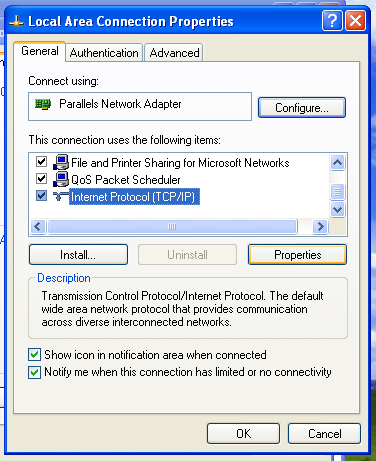
Highlight "Internet Protocol (TCP/IP)" and select "Properties":
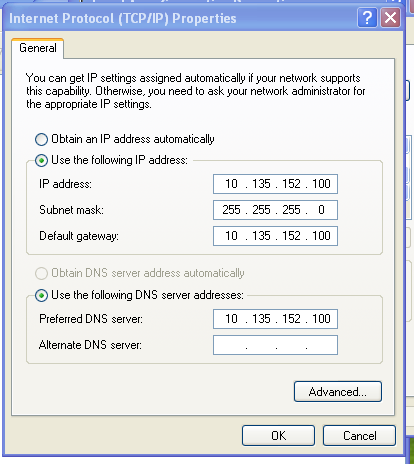
Change your settings so that they match the above settings. Then click OK to all open windows.
You should now be able to ssh as root to 10.135.152.250 to get to the crate computer.